A Clean Digital Desk for Returning After Time Away
A clean digital desk helps you resume after time away: recover the right thread, decide what can wait and leave a clear route back to unfinished work.
You open your laptop after a few days away and find a draft under a chat window, several browser tabs and a calendar reminder whose purpose you cannot quite recall. A clean digital desk for returning after time away is less about arranging windows than recovering the thread of a piece of work without mistaking old clues for current instructions.
The useful question is not simply what to close. It is which evidence can tell you where the work stands, what has changed while you were away and what needs a reply before you can proceed. Treat the screen as a set of clues to verify, rather than a queue of demands.
A clean digital desk begins with checking the work’s history
Start with the document or project you believe you were working on, rather than opening every communication app at once. Check its saved state, recent edits and any comments or tracked changes. A file’s last-modified detail can help you locate recent activity, but it does not tell you whether that activity was yours or whether the work is ready to continue.
Next, look for the last deliberate handover: a note in Apple Notes, Microsoft OneNote, Google Docs or your task manager; a calendar entry; or a message that records a decision. Compare that note with the current file. If they disagree, treat the discrepancy as something to resolve, not as a reason to follow whichever clue is easiest to see.
Keep the search bounded. Check the project’s normal folder and the place where you record tasks before searching the entire computer. This makes it easier to distinguish the current working copy from an old export or duplicate without turning a return to work into a broad filing exercise.
Separate confirmed changes from assumptions
After time away, an old plan may no longer fit. A colleague may have answered a question, a deadline may have shifted, or a document may have changed. Look for concrete signs of change: a new comment, a revised task status, a dated message or an updated calendar entry. An unread badge alone does not tell you whether the message affects this piece of work.
When a change matters, update the record you use to coordinate the task. If a dependency is unresolved, note who or what you are waiting for and what can still be done independently. That prevents a paused task from appearing ready just because its window is open.
Do not silently replace an earlier decision with a guess. If the record is ambiguous and another person’s approval matters, ask that person or check the relevant source before making a consequential change. For routine personal work, a brief note about what remains uncertain is often enough to keep the uncertainty visible without keeping several apps open.
Keep a recovery trail instead of a screen full of reminders
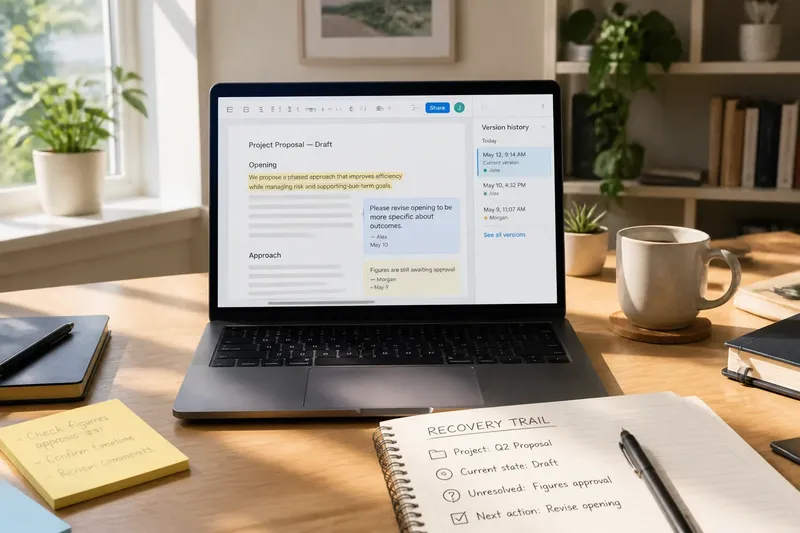
Open windows are unreliable records. A browser tab can be stale, a chat can be buried beneath another conversation, and a draft may not show why a particular choice was made. A small recovery trail is more useful: the project name, the current state, the unresolved point and the next action.
Use a note in the project’s usual home rather than scattering reminders across the desktop. A task in Todoist, Microsoft To Do or a project board can hold the next action; a short note beside the working document can preserve context that does not belong in a task title. Save browser pages to a named bookmark folder or reading list only when they are genuine references for that work.
Imagine you return to a shared proposal with a draft, a comment asking for a revised opening and a message saying the figures are still awaiting approval. You check the document history, confirm the comment is current, and add a task to revise the opening while recording the figures as a dependency. You close the unrelated meeting tab and leave the draft plus the relevant comment in view. The resulting decision is clear: revise what is ready, but do not present the figures as approved.
Choose a return action that respects what is still unknown
A useful first action should be possible with the information already confirmed. It might be reviewing a comment, correcting a section, sending a focused question or preparing a version that clearly marks an unresolved part. Avoid choosing a broad project label such as “finish proposal”; it hides the decision you need to make next.
Before you act, check whether the work is shared and whether your change could overwrite someone else’s edits. In Google Docs or Microsoft Word, review comments and version history where appropriate; in a shared folder, confirm you have the current file. If the status is unclear, pause and ask the owner rather than editing a possibly outdated copy.
Once you have chosen the next action, keep only the material that supports it available. The point is not to make the screen look spare. It is to keep your attention on the verified part of the work while leaving unresolved questions recorded in their proper place.
What should you check before resuming?
How can I tell which file is current?
Check the project’s normal storage location, file name, recent edits and any version history or shared-document activity. If two copies remain plausible, confirm with the file owner before editing either one.
What if my last note conflicts with a newer message?
Compare dates and look for an explicit decision, not merely a later timestamp. If the message does not clearly settle the matter, ask the relevant person and record the answer where the task is tracked.
Should I answer messages before reopening my work?
Only if a message changes what you can safely or sensibly do next. Otherwise, note a time to review messages and return to the verified work rather than treating every unread item as a new priority.
What should I leave for my next return?
Record the file or project, what is complete, what remains uncertain and the next action that can be taken. Keep the note with the project or task, so it remains useful even if you close every window.
Use a short check to decide what stays in view
Check the working file’s saved state. If it contains unsaved changes, save or resolve them before closing; if the state is unclear, inspect the application’s version history or ask the file owner.
Check whether the file is in the project’s usual location. If it is the recognised shared copy, continue there; if it appears to be a duplicate or old export, verify the current copy before editing.
Check comments and tracked changes for an explicit request. If a request is current and within your authority, record the action and proceed; if it needs approval or clarification, ask before changing the shared work.
Check messages for a decision that changes the task. If a message clearly changes the next action, update the task record; if it is only an alert or acknowledgement, leave it for the planned message review.
Check whether a dependency blocks the whole task or only one part. If other work can proceed independently, choose that part; if nothing can move safely, record who or what you are waiting for and follow up through the usual channel.
Check each open tab or window for a direct role in the chosen action. If it provides a needed reference, keep it available or save it in the project’s normal place; if it is only a reminder, close it and put the reminder in the task or handover note.
Check whether a notification requires an immediate response. If it changes a commitment or blocks someone, handle or record it before resuming; if it does not, defer it to the next planned check-in.
Leave a useful handover when you stop
Before stepping away, save the work and write a brief note in its usual home. Name the document, say what you changed, identify any unresolved dependency and state the next action in plain language. “Review the two comments on the introduction” gives a clearer route back than “continue proposal”.
If someone else needs to act, record the request and where you sent it; do not rely on leaving a chat window open. If the work is waiting for a decision, make that status visible in the task or project record so it is not mistaken for an abandoned draft.
A clean digital desk for returning after time away is built from a reliable trail, not from perfect tidiness. When you can see what is confirmed, what is waiting and what can move next, closing the screen no longer means losing your place.